EEG101 welcomes researchers at all career stages — from PhD students to full professors — as well as industry professionals, clinicians, and open science advocates. Membership is free.
What membership gives you
- Access to COST grant schemes (STSMs, VMGs, Conference Grants)
- Participation in Working Groups and community activities
- Access to the EEG101 Discord community
- Invitations to EEG101 events and distributed conferences
- Access to training resources, datasets, and tools as they are developed
- Opportunities to contribute to the EEG Manifesto and community standards
How to join
An overview of the journey from first interest to taking part. Please sign the EEG101 Community Framework (step 2) before you apply. Steps 3 and 4 then take place on the e-COST platform, and the Step-by-Step Guide below takes you through both, screen by screen.
Explore EEG101 and choose your Working Groups
Read about the EEG101 aims and objectives and the Working Groups, and decide which group or groups you would like to join. You will select them in your application.
Sign the EEG101 Community Framework
Before you apply through e-COST, read and sign the EEG101 Community Framework. The Framework sets out the shared commitments behind EEG101: scientific integrity and reproducible practice, diversity and inclusion, and societal and environmental responsibility. You can sign all of it or the parts you support, and signing is how you show you share the values of the community you are joining.
Create an e-COST account
Membership is managed through COST’s e-COST platform. Go to the e-COST platform ↗, select Create an account, and activate the account from the email e-COST sends you. If you already have an e-COST account, sign in and go straight to step 3.
Come back to this page and apply to EEG101
Once your account is active and you have signed the Community Framework, return here and use this link to apply to EEG101 (COST Action CA24148): apply to EEG101 on e-COST ↗. Select your Working Groups and submit the application.
Wait for your application to be approved
Every application is reviewed, so approval is not automatic. EEG101 normally responds within a couple of days, within COST’s formal timeframe of up to three months. What happens after you submit.
Connect with the community
Once you are approved, you will receive an invitation to the EEG101 Discord community, where Working Group channels and meeting announcements are hosted. Introduce yourself, join Working Group activities, and come along to webinars and events.
Apply for grants
As part of the Action, you can apply for EEG101 grant schemes. The Grants page sets out open calls, deadlines and who is eligible for each.
Step-by-Step Guide
There are two key steps to joining an EEG101 Working Group: first, create and activate an e-COST account; second, complete the profile prerequisite and submit the EEG101 Working Group application. The annotated screenshots below show the process from the live e-COST interface. Personal information has been redacted.
This guide expands steps 3 and 4 of How to join above. If you have not yet done so, please sign the EEG101 Community Framework (step 2) before you begin.
Create the e-COST account
Register the account, enter your personal and scientific information, create a password, accept the required COST principles, and activate the account from the email link.
Steps 1 to 7 2Apply for Working Groups
Complete the required primary affiliation, open the EEG101 application, select the relevant Working Groups, write the three short responses, and submit the application.
Steps 8 to 10Stage 1 Create and activate the e-COST account
Open e-COST registration
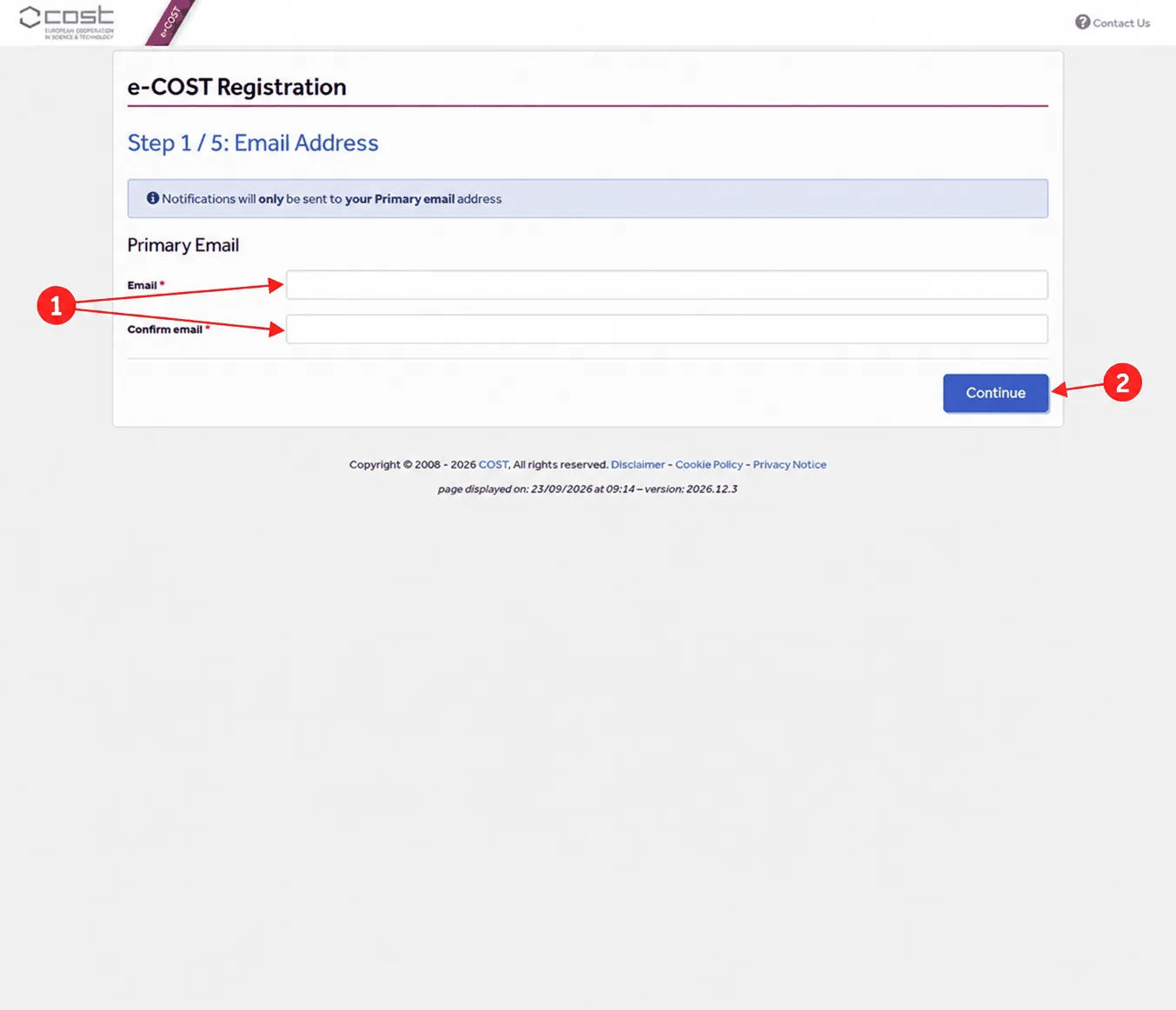
Go to the e-COST login page ↗ and select Create an account. Enter your primary email address twice. e-COST sends all notifications, including the activation message, only to this primary address. Select Continue.
Complete your personal information
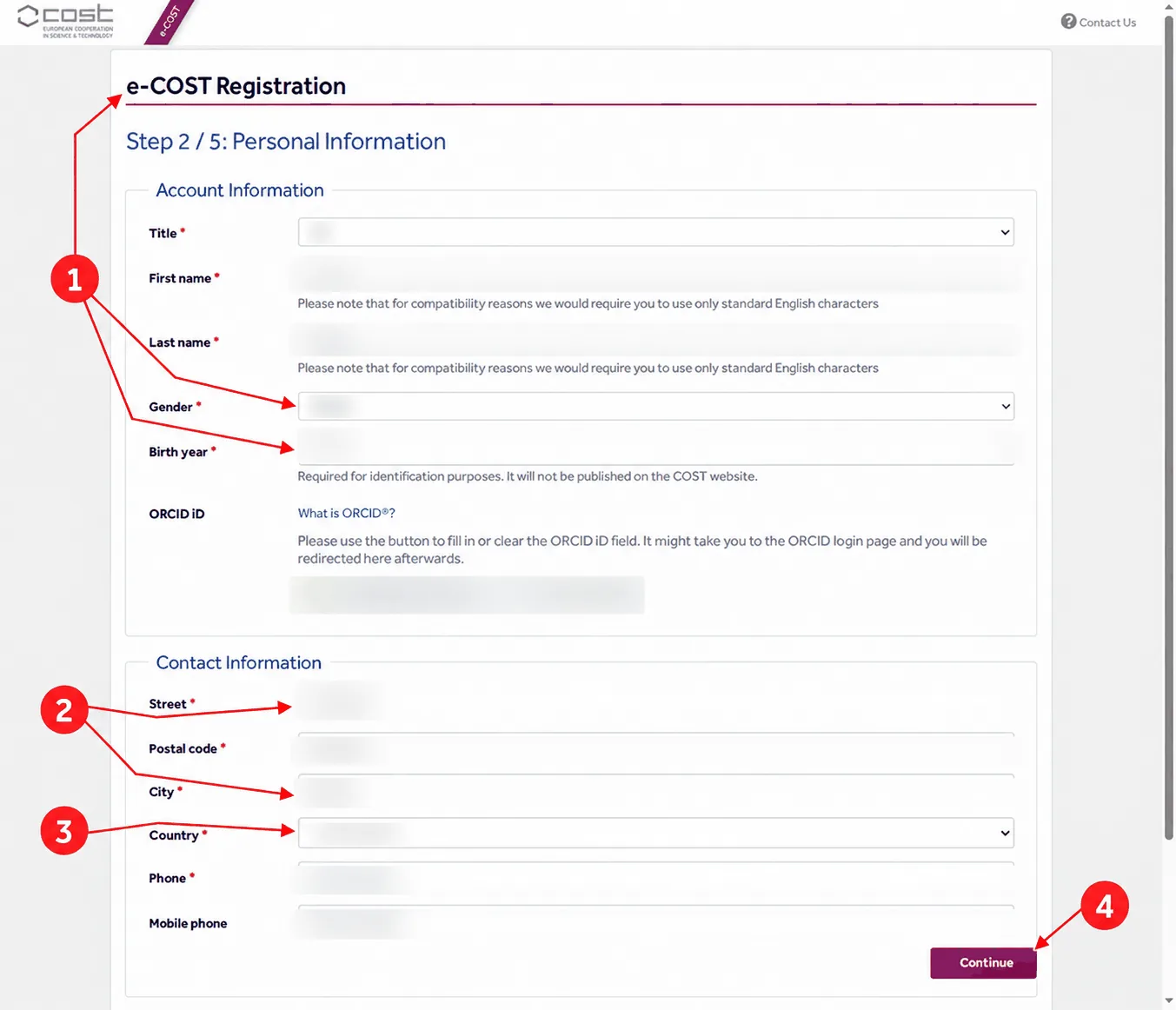
Enter your title, first name, last name, gender and birth year. The birth year is required for identification and is not published on the COST website. The form also asks for your ORCID iD, address, country, phone and mobile phone. ORCID is optional, but it helps to distinguish researchers with similar names.
Add your scientific information
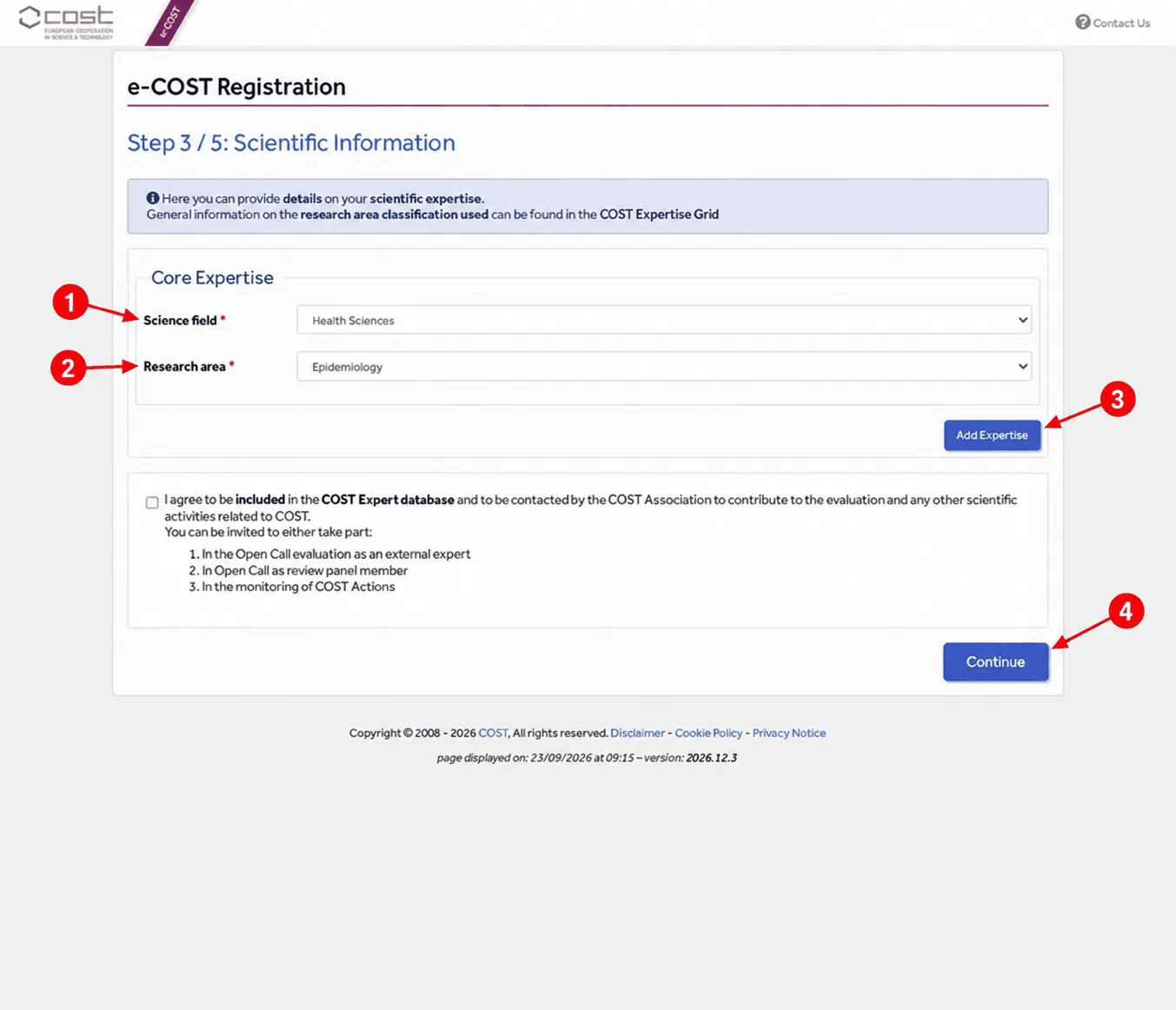
Choose the science field and research area that best match your work. In the example shown, the selection is Health Sciences followed by Epidemiology. Use Add Expertise to record further areas if you wish. The COST Expert database checkbox is optional: leave it unticked unless you also want to be contacted for COST expert activities. Select Continue.
Create a password
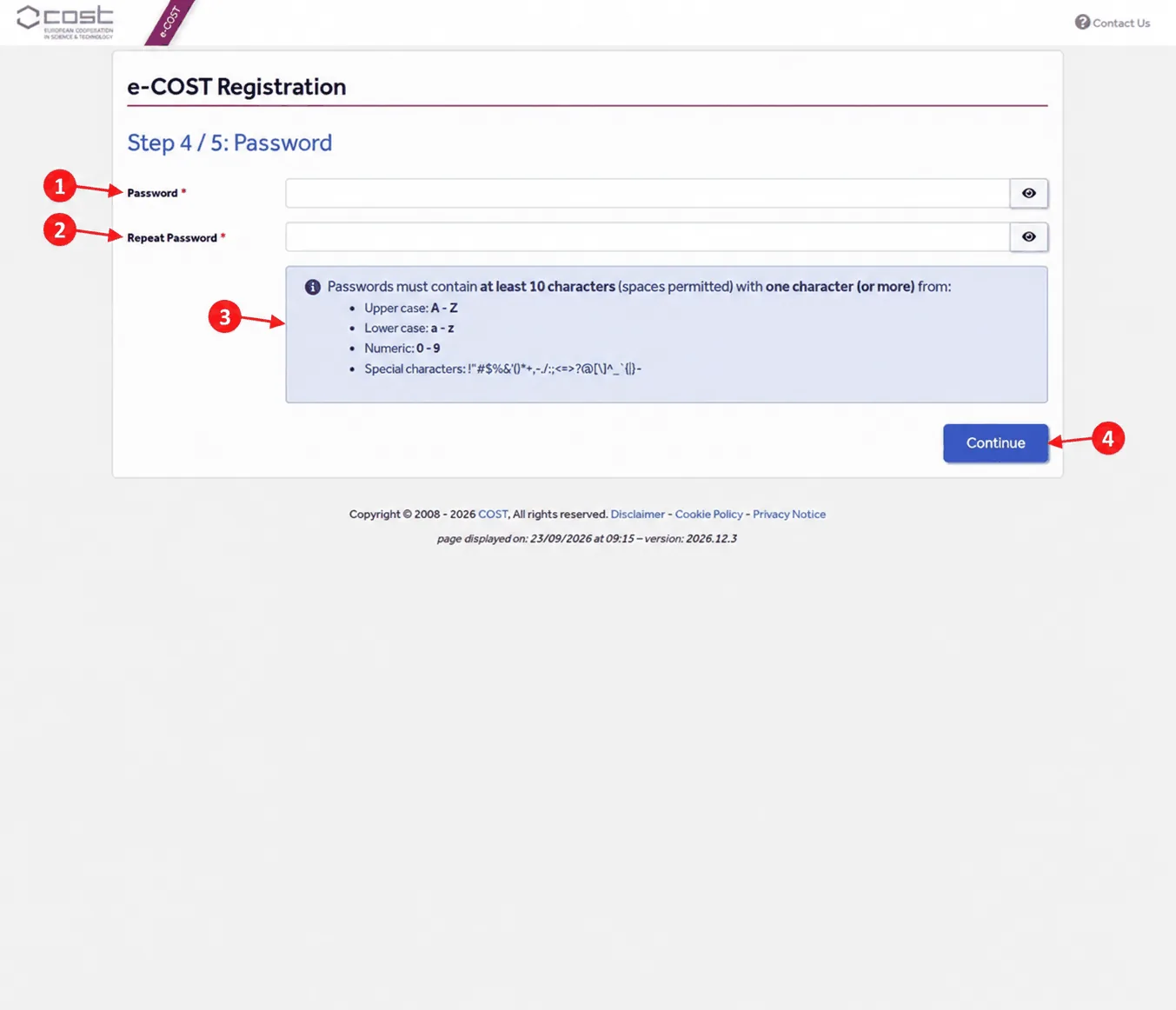
Enter the same password twice. e-COST requires at least 10 characters, including at least one uppercase letter, one lowercase letter, one number and one special character. Store your password securely and never share it.
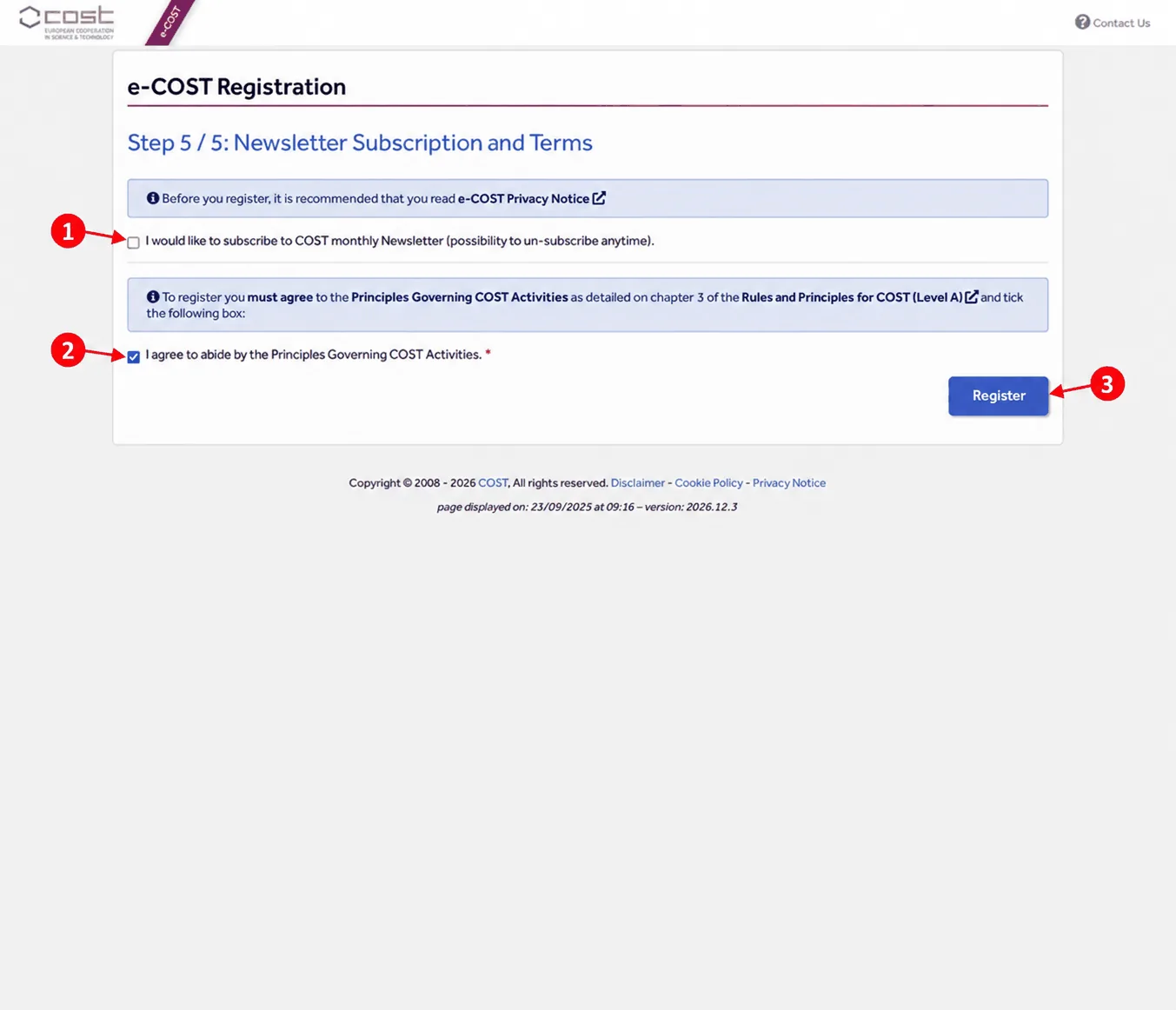
Review the terms and register
The monthly COST newsletter is optional. Agreeing to the Principles Governing COST Activities, set out in chapter 3 of the Rules and Principles for COST Activities ↗, is required. Tick the required agreement and select Register.
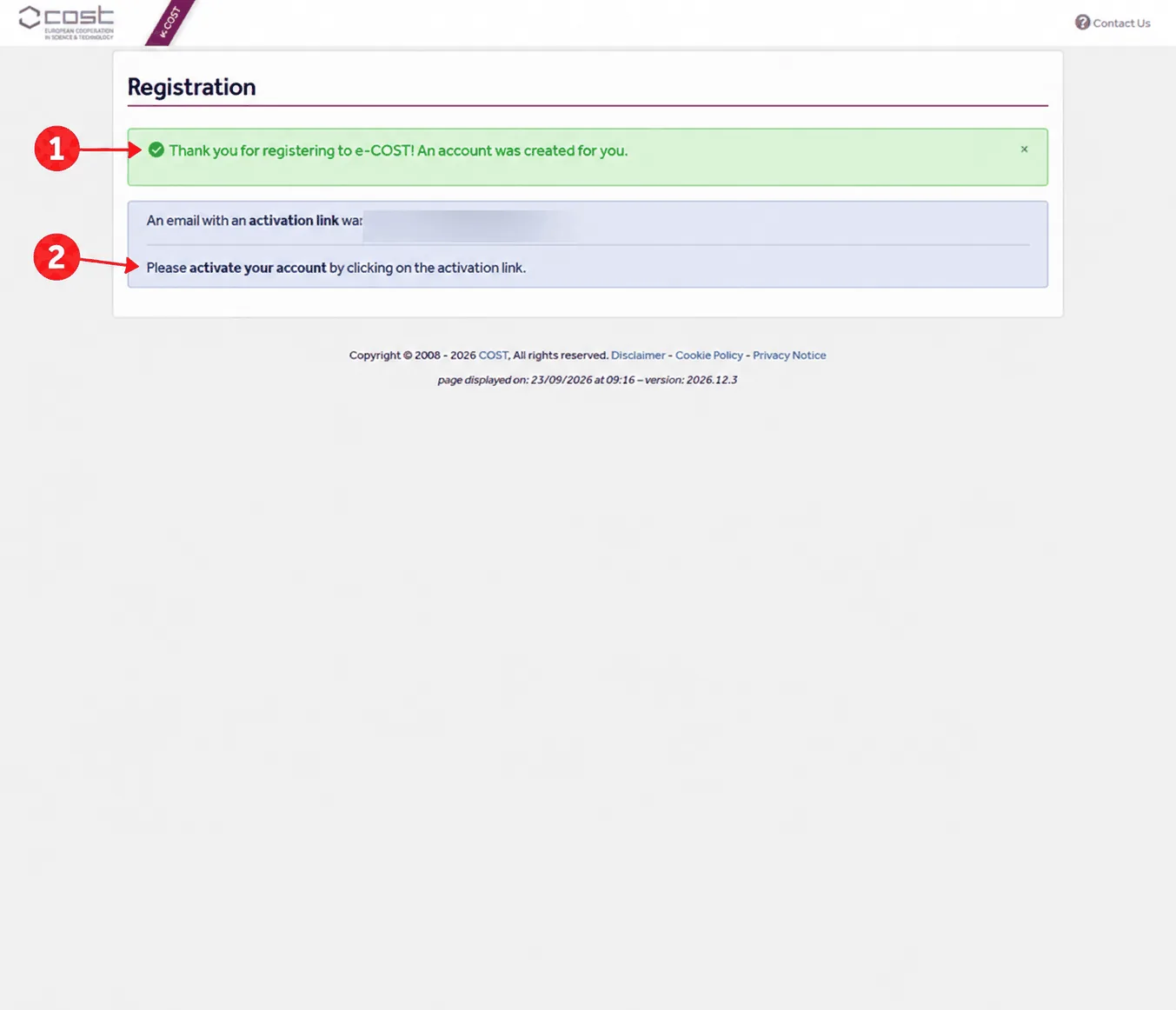
Activate your account
After you register, e-COST shows a confirmation and sends an activation link to your primary email address. Open that email and follow the activation link. If it does not arrive, check your spam or junk folder, and make sure you are looking in the inbox of the address you entered in Step 1.
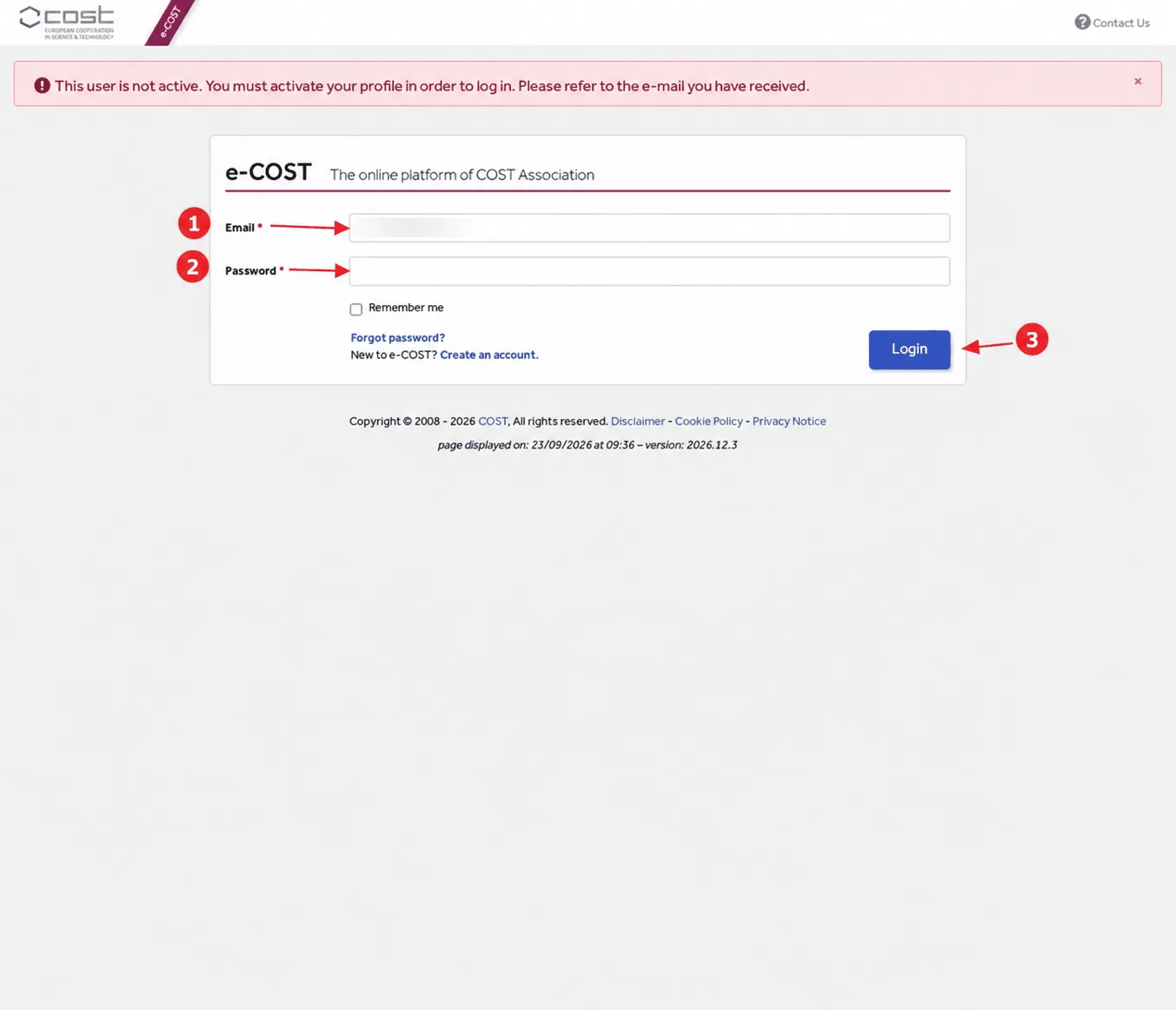
Confirm activation before applying
Return to the e-COST login page ↗ and sign in once you have followed the activation link. An account that has not been activated cannot log in or open the Working Group application. If you see the message that the user is not active, complete activation from the email first.
Stage 2 Apply for EEG101 Working Groups
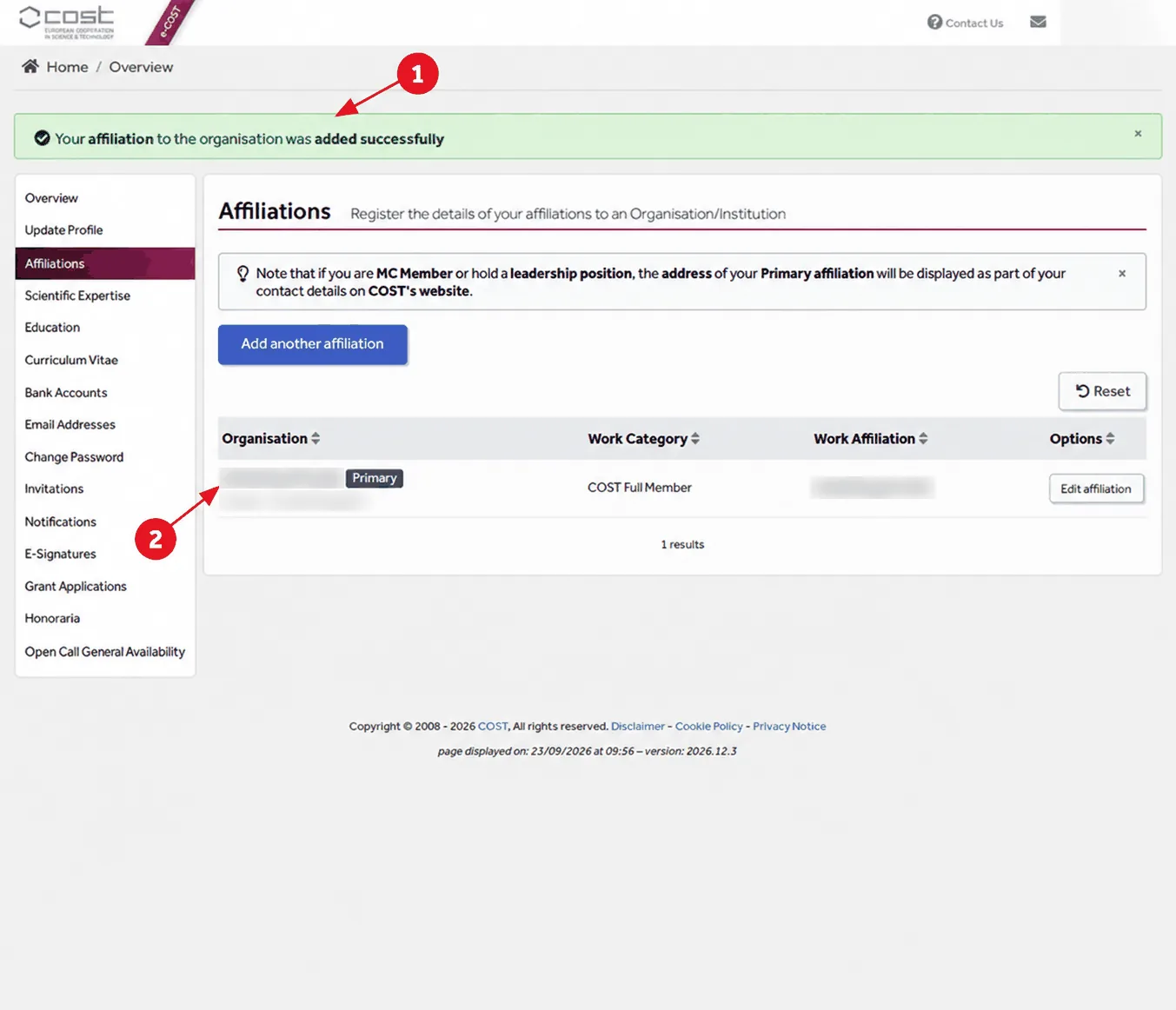
Complete the required profile affiliation
After activation, e-COST may take you to your profile and ask for a current primary affiliation before it opens the Working Group form. Select Add affiliation, search for your organisation using at least four letters, and choose the validated organisation record. Select your actual work address, then enter your department, job position and institutional website. Save the affiliation and check that it appears as your Primary affiliation.
Open the Working Group application
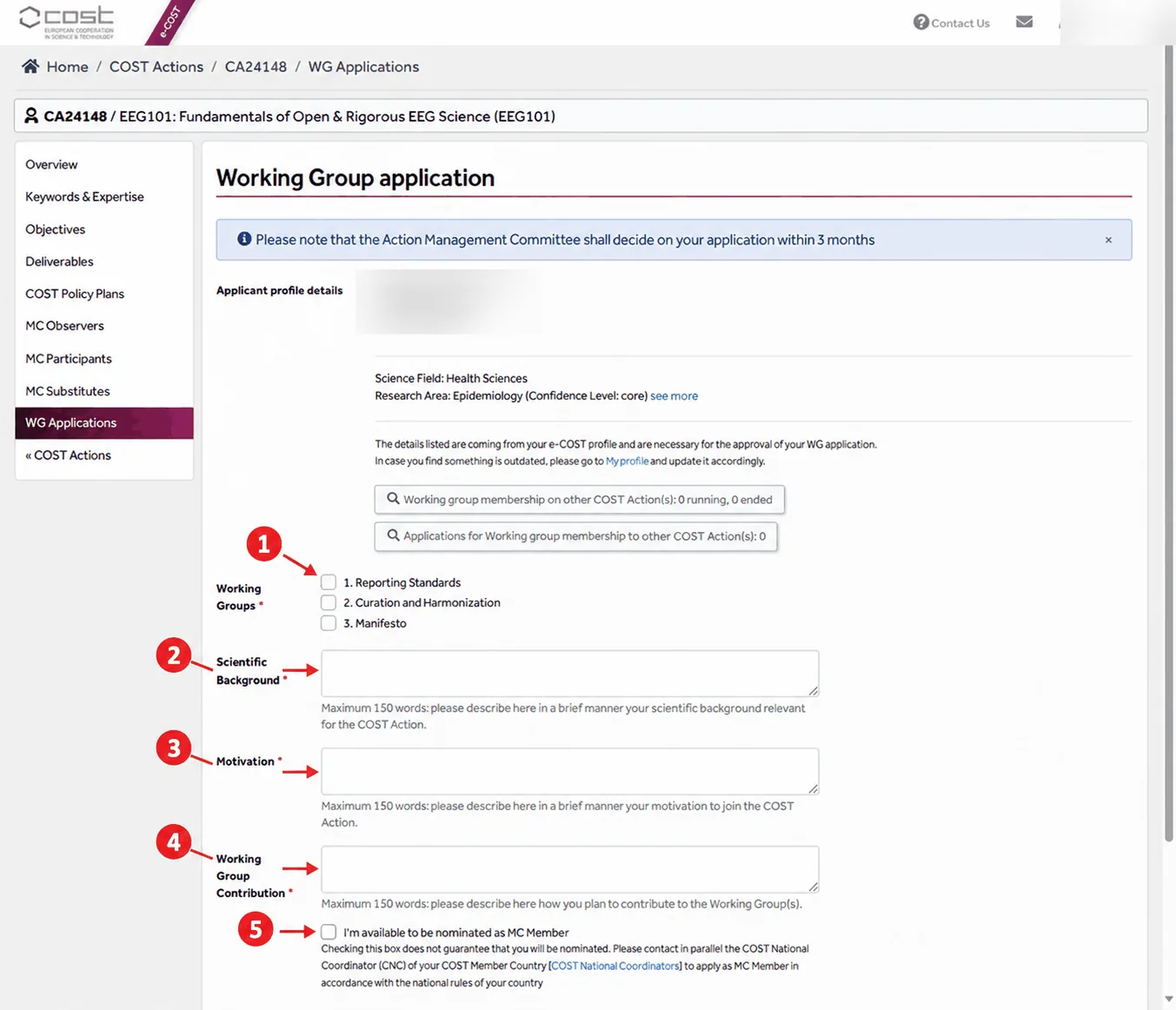
Once your account is activated and your profile is complete, sign in to e-COST and open the EEG101 Working Group application ↗. The form shows your profile details and research area, then asks you to choose one or more Working Groups:
- 1. Reporting Standards: standardised reporting, templates, pre-registration and reproducible EEG methods.
- 2. Curation and Harmonization: FAIR EEG data, harmonised pipelines and data that can be compared across laboratories.
- 3. Manifesto: ethical, open and sustainable principles for EEG research. This website presents this work as the EEG Community Framework.
Write your three responses and submit
The form has three required text boxes, each with a maximum of 150 words:
- Scientific Background: your scientific background relevant to the Action.
- Motivation: why you want to join EEG101.
- Working Group Contribution: how you plan to contribute to the Working Group or groups you selected.
Two further checkboxes ask whether you are available to be nominated as an MC Member, or to substitute an MC Member or Observer. These are optional; tick them only if you intend to pursue those roles (see Management Committee nominations below).
The form offers Save and Save and Submit. Use Save to keep a draft, and Save and Submit only once you have checked your Working Group choices and all three responses.
The e-COST form states that the Action Management Committee decides on applications within three months. The EEG101 page on the COST website ↗ likewise invites you to express your interest by applying through e-COST, for which an e-COST profile is required. Creating an account on its own does not make you a member of EEG101: membership follows approval of your Working Group application.
After you submit
You must now wait for your application to be reviewed; approval is not automatic. COST advises allowing up to three months for a decision, and that remains the formal timeframe. EEG101 aims to review applications much more quickly, so you should normally allow a couple of days at most. This is EEG101’s usual turnaround rather than a guarantee from COST.
Open the EEG101 application on e-COST ↗ Back to the start of the guide
Management Committee nominations
National Management Committee (MC) representatives are nominated through COST National Coordinators in each country. Each country has a maximum of two representatives. If you are interested in representing your country on the EEG101 MC, and you see that there is an available slot, then contact your COST National Coordinator and write a short email to the Action Chair.
Who can join?
EEG101 is open to researchers and professionals from COST Full Member countries and COST Cooperating Member countries, as well as approved Near Neighbour Countries. This includes academics, industry professionals, clinicians, and others working in or adjacent to EEG research.
Researchers from non-member countries may participate as observers and collaborators in many activities, though formal grant eligibility is subject to COST membership rules.
Please sign the Community Framework first, then apply through e-COST.
1. Sign the Community Framework 2. Join via e-COST ↗